



Description
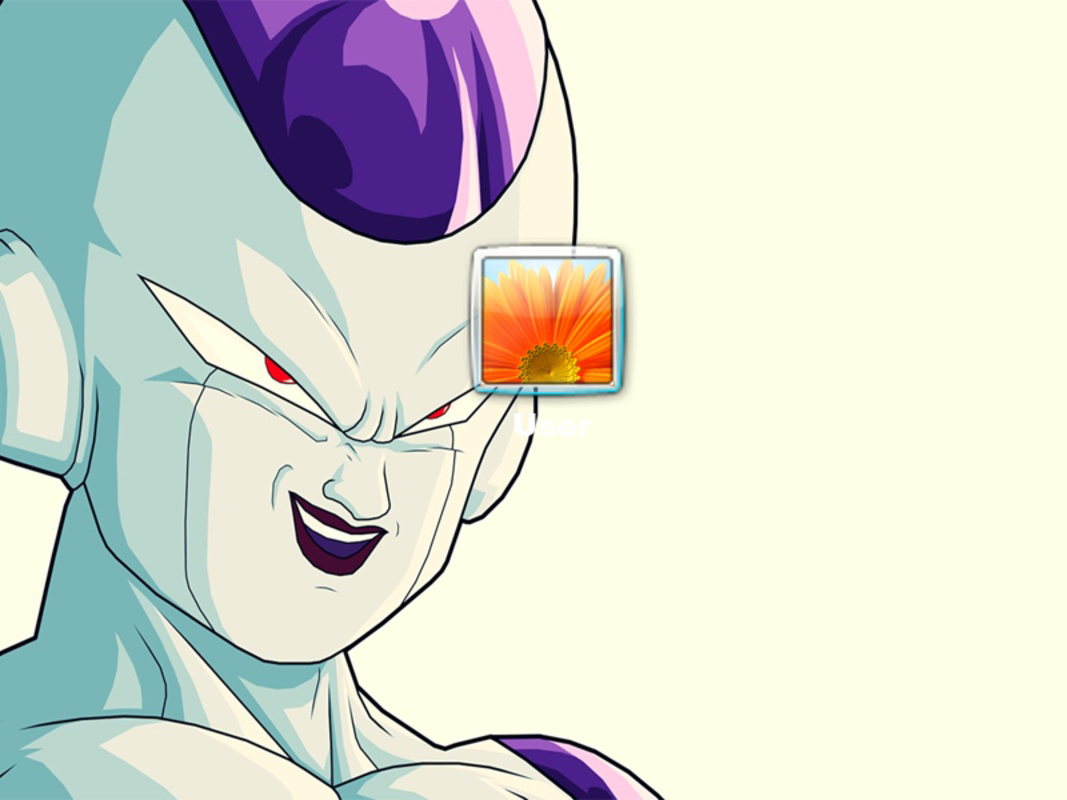
Download Dragon Ball Z Logon Screen – Dragon Ball, Goku, Vegeta, Gohan, Piccolo, Freezer, Cell
Overview
Dragon Ball Z Logon Screen is a specialized digital tool designed for Windows users seeking to personalize their computing experience with high-definition imagery from the beloved Dragon Ball franchise. This application delivers a curated collection of five startup screen visuals, each capturing iconic moments and characters from the series. Its primary purpose is to transform the standard log-on interface into a visually immersive gateway that reflects the energy and drama of the Dragon Ball universe. For fans of the series, this tool offers a simple yet effective way to express their fandom every time they power on their device.
The target audience includes dedicated Dragon Ball enthusiasts, collectors of themed digital content, and users who value aesthetic customization in their operating systems. While the developer did not provide additional background information, the app’s focused functionality suggests a niche-oriented release aimed at fans rather than general utility. Real-world use cases include personal computers used for gaming, entertainment, or creative work, where visual identity plays a significant role in user satisfaction.
Within the broader app ecosystem, Dragon Ball Z Logon Screen occupies a unique space as a lightweight, non-invasive utility. It does not require installation of complex software or system modifications, making it accessible to users with varying technical skill levels. Its significance lies in enhancing user engagement through visual storytelling, turning a routine system process—logging in—into a moment of personal connection with a cherished franchise.
Key Features & Functionality
- High Definition Images: The package includes five 1080p or higher resolution logon screens, each rendered with vibrant colors and sharp details. These visuals are optimized for modern Windows displays, ensuring clarity and visual impact during startup.
- Iconic Character Representation: Featured characters such as Goku, Vegeta, Gohan, Piccolo, Freezer, and Cell are depicted in dynamic poses and signature battle scenes, appealing to fans across different eras of the franchise.
- Full Customization Freedom: Users can switch between the five provided images at any time through standard Windows settings, allowing for mood-based or event-driven personalization.
- Watermark-Free Design: All images are delivered without any logos, text, or branding, preserving the integrity of the artwork and ensuring a clean, professional appearance on the log-in screen.
- Franchise-Centric Focus: The entire set is designed to evoke nostalgia and excitement, making it ideal for users who want to maintain a consistent thematic experience across their digital environment.
For example, a user might choose Goku’s Super Saiyan transformation during a workout session to inspire motivation, or switch to Cell’s menacing form before a gaming session to set the tone. The flexibility in switching images supports both emotional and practical use cases, reinforcing the app’s role as a subtle yet meaningful enhancement to daily computing.
Interface, UX & Performance
The interface of Dragon Ball Z Logon Screen is intentionally minimal, as it does not operate as a standalone application with a graphical user interface. Instead, it functions as a file package that users manually apply through Windows’ built-in logon screen settings. This approach reduces system overhead and avoids conflicts with other software.
Navigation is straightforward: users extract the files, access the Personalization settings in Windows, and select one of the provided images as their log-on screen. The process requires no technical expertise, making it accessible to average users. The visual style is consistent with the original Dragon Ball Z artwork, featuring bold lines, vivid color gradients, and dramatic lighting effects that align with the series’ aesthetic.
Although the developer did not list formal performance metrics, the lightweight nature of the image files suggests minimal impact on system resources. The application does not run in the background, nor does it consume CPU or memory during operation. Responsiveness is tied entirely to the underlying operating system’s handling of logon screen rendering, which is typically stable across modern Windows devices.
Stability is maintained through the use of standard Windows-compatible image formats, ensuring compatibility with most current and legacy versions of the OS. Users can expect consistent results across different hardware configurations, from entry-level laptops to high-end desktops.
Platform Compatibility & Technical Requirements
Dragon Ball Z Logon Screen is designed for the Windows operating system. The app is compatible with Windows 7 and later versions, including Windows 10 and Windows 11, based on the file formats and standard image rendering methods used.
The file size of the package is approximately 200 MB, which includes all five high-definition images in JPEG or PNG format. This size allows for high-quality visuals without excessive storage consumption.
The developer did not specify minimum OS requirements or exact version compatibility beyond general Windows support. Users are advised to ensure their system meets the standard requirements for running Windows with graphical logon features enabled.
Pros and Cons
Pros
- High-quality, detailed images that enhance the visual appeal of the startup screen
- Features popular characters from the Dragon Ball Z series, appealing to fans
- Complete freedom to switch between images at any time
- Delivered without watermarks or branding for a clean, professional look
- Minimal system impact and no background processes
Cons
- No standalone app interface; users must manually apply images through system settings
- Limited to five images; no additional content or updates provided
- Compatibility with older Windows versions is not explicitly confirmed
- Does not support mobile platforms or non-Windows operating systems
- Requires manual installation and file management
FAQ
Is Dragon Ball Z Logon Screen safe to download and install?
The application is a static image package with no executable code. As long as it is downloaded from a trusted source, it poses no security risk. Users should avoid third-party sites that bundle the file with malware.
Can I use this on my Android or iOS device?
No. This tool is specifically designed for Windows operating systems and is not compatible with mobile platforms such as Android or iOS.
Do I need to install software to use this app?
No. The package consists of image files only. Users apply them directly through Windows’ Personalization settings without installing additional software.
Are the images copyrighted?
Yes. The artwork is based on copyrighted material from the Dragon Ball franchise. This package is intended for personal use only and should not be distributed commercially.
How do I update the logon screen images?
Since the package is static, updates are not available. Users can manually replace the current image with another from the set through the system settings.
Final Thoughts
Dragon Ball Z Logon Screen delivers a focused, fan-first experience that transforms the mundane act of logging in into a moment of celebration for enthusiasts of the series. With its high-quality visuals, character diversity, and watermark-free design, it stands out as a reliable and enjoyable customization tool for Windows users. While it lacks advanced features or cross-platform support, its simplicity and purpose-driven design make it highly effective within its niche.
Those who value personal expression through digital environments—especially long-time fans of Dragon Ball Z—will find significant value in this tool. It’s a small but meaningful way to carry the spirit of the franchise into everyday computing.
Download Dragon Ball Z Logon Screen now
Guides & Tutorials for Dragon Ball Z Logon Screen
How to install Dragon Ball Z Logon Screen
- Click the Preview / Download button above.
- Once redirected, accept the terms and click Install.
- Wait for the Dragon Ball Z Logon Screen download to finish on your device.
How to use Dragon Ball Z Logon Screen
This software is primarily used for its core features described above. Open the app after installation to explore its capabilities.
User Reviews for Dragon Ball Z Logon Screen 0
No reviews found


